Web development
UI/UX Design
SEO optimization
Performance optimization
CMS integration
UI testing
Data analytics
Security practices
Business Website Design Checklist: What Every Company Needs
Iliya Timohin
2024-12-25
A business website is often where potential clients decide whether to learn more about a company or leave within a few seconds. Without a clear business website checklist, even experienced teams can launch a site that looks modern but fails on structure, content, accessibility, or analytics. This article provides a practical website design checklist for businesses, covering domain and hosting decisions, core pages, UX and accessibility, mobile-first layout, performance, and launch testing. Pinta WebWare designs and develops business websites and web applications, and the checklist is based on patterns we regularly see in real client projects.
Domain and Hosting: Core Technical Decisions for a Business Website
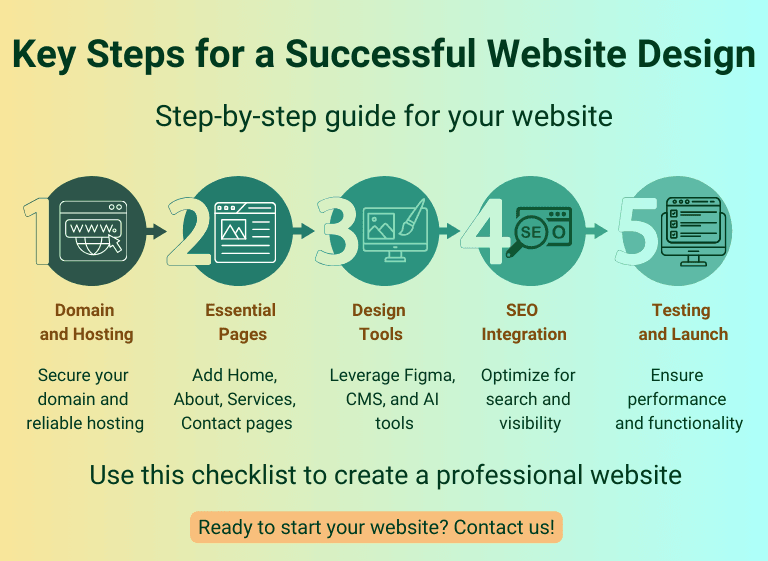
For any business website checklist, domain and hosting are the first technical decisions that affect everything that comes next: performance, security, reliability, and even how people perceive the brand. The domain name should be easy to remember, relevant to the company’s name or core service, and simple to type without confusion. It becomes part of the business identity in search results, email addresses, and marketing materials.
Hosting is not just a place where files are stored, but an ongoing service that determines whether the website is available, fast, and stable under real traffic. When selecting a hosting provider, teams should look beyond price and check uptime guarantees, performance under load, available support, data center locations, backup options, and the ability to scale as the website grows. Documenting these choices in a website design requirements checklist helps avoid surprises later, when marketing campaigns start driving more visitors to the site.
Essential Pages That Build Trust and Drive Engagement
For most companies, a business website checklist starts with the same question: which pages are absolutely essential for a visitor to understand the offer, build trust, and take action. A typical structure for a business website includes a small set of core pages that combine information, proof, and clear next steps.
- Homepage. The homepage is where most visitors form their first impression and decide whether to stay or leave. It should clearly state what the company does, who it serves, and what the main next steps are (for example, exploring services, viewing case studies, or requesting a consultation), instead of trying to show everything at once.
- About page. An About page is not only a story about the company but also a way to explain why it is qualified to solve the problems it addresses. Mission, values, and short facts about experience, industries, and team help reduce uncertainty for new visitors.
- Services or Products. Dedicated pages for services or products describe what the company offers, for whom each service is designed, and what outcomes clients can expect. Clear structure, consistent naming, and links to relevant case studies or examples make it easier for decision-makers to compare options. Pricing can be shown directly or described in ranges, depending on the sales model.
- Contact page. A contact page should make it easy to start a conversation: a simple contact form, email address, and, where appropriate, phone number and office details. It is also a good place to set expectations about response time and next steps after a form submission.
- Blog or Resources. A blog or resources section is useful when a company plans to publish content regularly: articles, guides, or updates that answer typical questions and support SEO. It is better to treat this as a long-term commitment rather than a placeholder with one or two posts.
- Testimonials and reviews. Testimonials, reviews, and short client quotes help turn abstract promises into concrete social proof. They can live on a separate page or be integrated into services, case studies, and the homepage.
Mapping these essential pages into a website design requirements checklist helps keep the structure focused: every page must have a clear purpose, a primary audience, and a next step for the visitor.
Tools of the Trade: Must-Have Tools for a Business Website Project
A practical business website checklist covers not only pages and content, but also the tools that designers, developers, and marketers will rely on throughout the project. Choosing them early helps avoid friction later, when the team is already working under deadlines.
Design and prototyping tools. Modern design tools such as Figma, Sketch, or Adobe XD help teams create wireframes, clickable prototypes, and design systems before a single line of code is written. This makes it easier to validate user flows with stakeholders and adjust the layout before development starts. For companies that need help translating business requirements into interfaces, a dedicated UI/UX design team can formalise user journeys and design systems early in the process.
Responsive front-end frameworks. For many projects, using a well-tested CSS or front-end framework (for example, a responsive grid system or component library) helps ensure consistent behaviour on different screen sizes. This is especially important when the website must support complex layouts or multiple page templates.
Content management system (CMS). A CMS such as WordPress, MODX, or another modern platform allows non-technical team members to manage pages, blog posts, and basic settings without touching code. The choice of CMS should reflect business requirements: expected traffic, security needs, integration with other systems, and internal editorial workflows. When teams do not have in-house developers, working with a partner that provides custom web development can help select and configure a CMS that fits these requirements instead of forcing everything into a generic template.
Analytics and SEO tools. At minimum, a business website should be connected to Google Analytics 4 and Google Search Console to track traffic, user behaviour, and search performance. Additional SEO tools can be used to monitor rankings, identify technical issues, and analyse competitors, but they work best when the basics are already in place.
AI-assisted tools. AI-based tools can support the team with ideas, draft copy, or design variations, but should not replace clear requirements or professional review. They are most useful when there is already a defined structure and strategy for the website.
Documenting design, development, and analytics tools in a website development checklist makes responsibilities clear: everyone knows which platforms are used, who has access, and how success will be measured.
SEO Integration: Building Visibility into Your Business Website Checklist
In a business website checklist, SEO should be treated as part of the initial design and content planning, not as something added after launch. The goal is to make it easy for search engines to understand what the website offers and for the right visitors to discover it.
Keyword research and page focus. Before writing content, teams should agree on which search intents each page will cover. Basic keyword research helps define a clear focus for core pages such as services, solutions, and resources, so that every page answers a specific set of questions instead of trying to rank for everything at once.
Meta titles and descriptions. Meta titles and descriptions are often the first elements potential visitors see in search results. They should state what the page is about, who it is for, and what action a visitor can take next. Aligning these elements with the content of the page makes the website design checklist stronger and reduces the risk of “orphan” pages that appear in search without a clear purpose.
Image and performance optimization. Images should be compressed, sized appropriately for each layout, and provided with descriptive alt text. This supports both performance and accessibility, and is easier to handle while templates are still being designed than after dozens of pages are already live. Basic accessibility practices, such as clear headings, focus states, and form labels, can follow accessibility design tips from W3C, while the WCAG 2.1 accessibility standard offers a more formal set of criteria for teams that need compliance.
Internal linking and structure. Internal links help search engines understand which pages are most important and guide visitors through typical journeys: from the homepage to services, from services to case studies, and from articles to contact forms. A website development checklist should include basic rules for internal links so that new pages do not break the overall structure.
Mobile and small-screen experience. With mobile-first indexing, search visibility depends heavily on how well the website works on phones and tablets. Layouts, navigation, and forms should be tested on real devices, not only in desktop mockups. For teams that want to explore this topic in more detail, the article on mobile-first UX covers small-screen design considerations more deeply.
Connecting the website to Google Analytics 4 and Google Search Console from the very beginning closes the loop: teams can see how pages perform in search, which queries they attract, and where visitors drop off. When these SEO and analytics tasks are part of a website design requirements checklist, the website is more likely to grow in visibility over time instead of becoming a static brochure.
Testing and Launch: Website Design Testing Checklist Before Go-Live
A business website design checklist is incomplete without a clear plan for testing and launch. Before a new or redesigned website goes live, the team should agree on what “ready” means and how each area will be checked. A simple website design testing checklist can prevent unpleasant surprises on launch day.
Functionality and content testing. All forms, CTAs, navigation elements, search, and interactive components should be tested across key templates. It is also important to check that core content is complete: headings, body copy, legal pages, and error messages. Broken links and placeholder text are easier to fix before launch than after visitors start noticing them.
Browser and device compatibility. The website should be tested in the main browsers and on several real devices, not only in design tools. This includes desktop, tablets, and phones to ensure that layout, navigation, and critical actions behave consistently.
Performance and stability. Performance tests should cover both page speed and how the website behaves under higher traffic. Tools like page speed checkers or load testing services can highlight slow templates, unoptimised media, or blocking scripts. For many companies, this becomes a recurring item in a broader website development checklist, especially when campaigns or promotions are planned.
Security and reliability. Basic security checks include valid SSL certificates, secure handling of forms, protection against automated spam submissions, and clear policies for updates and backups. For websites that handle sensitive data, additional security reviews may be required before go-live.
Analytics and tracking. Before launch, Google Analytics 4, Google Search Console, and key events (such as form submissions or important button clicks) should be configured and tested. This ensures that from the first day, the team can see how visitors actually use the website and whether the launch meets expectations.
Launch and communication plan. A launch plan defines when the website goes live, who is responsible for monitoring it, and how potential issues will be handled in the first hours and days. It should also cover basic communication: updating links from other channels, informing existing clients, and coordinating with marketing campaigns. Public-sector resources such as the federal website requirements checklist can be used as inspiration for grouping requirements into areas like content quality, security, accessibility, and governance.
For a major redesign, many teams treat this as a separate site redesign checklist, with stricter acceptance criteria and rollback scenarios. In all cases, writing down testing and launch steps as part of a website design testing checklist helps turn launch day from a stressful event into a controlled process.

Conclusion
Turning a Business Website Checklist into a Real Project
Designing a business website is more than choosing colours and layouts. It means translating business goals into a clear structure, well-defined pages, accessible design, and measurable outcomes. A business website checklist helps teams align on what the website must do for the company and how it will be evaluated after launch.
For some organisations, this checklist is enough to guide an internal team through planning, content, and coordination with developers. For others, especially when the project involves several services, complex user journeys, or integrations, it is more practical to work with a partner that has experience in custom web development and UI/UX design. Pinta WebWare helps companies structure requirements, prioritise features, and turn them into reliable web interfaces and user flows. In our online sessions platform case, for example, the website had to support gift certificates, expert selection, and online booking while staying clear and usable for end users.
Whether a company is planning its first website or preparing a redesign of an existing one, this business website design checklist can serve as a starting point for structured discussions between stakeholders, designers, and developers. If your team needs support in turning requirements into a launch-ready website, Pinta WebWare can help with planning, implementation, and long-term improvements.
This article was updated in December 2025 to reflect the latest recommendations for business website design.