Data analytics
Big data
CMS integration
DevOps practices
Performance optimization
S&OP Dashboard: From Multiple Systems to One View
Iliya Timohin
2026-03-02
When demand, inventory, production, and transportation data are stored across different systems, teams end up making decisions based on different numbers. In this situation, an S&OP dashboard stops being a management tool and becomes just a collection of reports. Sales and Operations Planning works only when the business has a single version of the truth — one view of reality — and a clear decision-making logic. In this article, we’ll explore how to consolidate data from ERP, TMS, WMS, and CRM into one picture, where data conflicts arise, and how to turn a dashboard into a decision-making tool rather than a visualization layer.
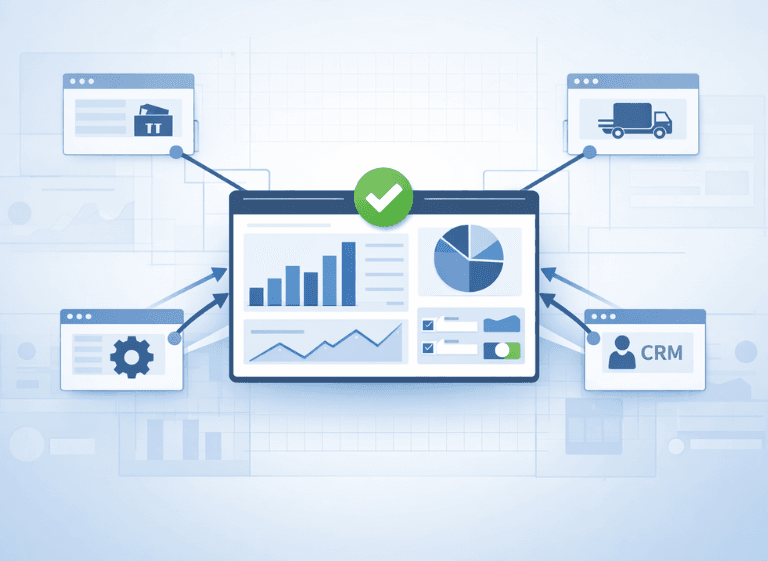
S&OP as a Shared Planning Rhythm
S&OP works only if the dashboard is the place where the same numbers drive the same decisions. Without that, the cadence turns into reconciliation — and the dashboard becomes background noise.
What S&OP Means for the Supply Chain
For supply chain teams, S&OP is a recurring decision rhythm — the S&OP process that balances demand, supply, capacity, inventory, and service levels against cost. When S&OP planning is mature, the dashboard earns its keep by making those trade-offs explicit and comparable.
When teams operate within the same planning rhythm, the company reacts faster to changes and reduces operational risks.
Why Numbers Diverge Without Alignment
If departments rely on different data sources — sales in CRM, logistics in TMS, warehouse in WMS, finance in ERP — multiple versions of reality appear. That’s how a dashboard quietly turns into a debate stage instead of a decision tool.
As a result, S&OP meetings turn into data reconciliation sessions instead of decision discussions.
Mini-conclusion: S&OP delivers value only when there is a single data source and a structured review cycle.
Integrating ERP, TMS, WMS, and CRM: Eliminating Data Conflicts
A unified supply chain dashboard — or a logistics dashboard, depending on scope — is possible only when systems are integrated. Without synchronization, data is updated at different speeds, duplicated, or inconsistent. ERP and CRM integration is where pipeline expectations turn into committed demand; WMS ERP integration is where promised inventory meets execution reality.
Building one view requires more than dashboards — it needs an integration layer and shared definitions across systems. Real-world patterns for this kind of cross-stack work are covered in TMS integrations.
What TMS Integration Solves and How It Differs from WMS
TMS governs transport execution constraints; WMS governs warehouse execution constraints.
The conflict shows up when one system says the plan is feasible and the other quietly can’t execute it (inventory isn’t pickable, cut-off times are missed, capacity is already consumed, or the carrier plan doesn’t match the warehouse wave). If your dashboard doesn’t reconcile those “truths” in the same time window, you’ll approve a plan that looks consistent on screen but breaks on the floor.
A useful dashboard makes the conflict visible by showing committed ship dates with both warehouse and transport constraint status (and a clear reason code) — so teams can decide, not guess.
The goal is not to “merge systems,” but to reconcile execution constraints into the same planning window so the dashboard stays decision-grade.
Where Data and Responsibility Conflicts Appear
Typical issues:
| System | Data for S&OP | Common Conflict | What the Dashboard Should Show |
|---|---|---|---|
| ERP | orders, finance, production | delayed updates | plan vs actual |
| TMS | delivery time and cost | transport constraints ignored | logistics risks |
| WMS | inventory and operations | stock discrepancies | product availability |
| CRM | pipeline and sales forecast | overestimated demand | realistic demand view |
Mini-conclusion: Data integration is the foundation of trust in the dashboard.
IBP, S&OP, and ERP: Moving Toward End-to-End Planning
As businesses grow, traditional S&OP is no longer enough. Companies need to understand the financial impact of operational decisions and evaluate alternative scenarios. For a practical framing of how teams evolve planning as complexity grows, see IBP vs S&OP.
What IBP Adds
Integrated Business Planning connects operational and financial plans, supports scenario modelling, and brings supply and capacity constraints into the same conversation. In the IBP process, IBP planning often sits alongside advanced planning and scheduling, because the goal is to commit to a feasible plan, not just view it. It’s less about “more dashboards” and more about making trade-offs measurable.
Strong data foundations matter; big data analytics is what keeps scenarios consistent across functions instead of turning them into spreadsheet debates.
Mini-conclusion: ERP tells you what happened; IBP is where you test trade-offs and commit to a plan across functions.
Scenario Planning: Making Trade-offs Visible in Advance
A baseline plan hides the real question: which trade-off are you choosing? Scenario planning makes the trade-offs explicit — service level vs cost, inventory vs cash, capacity vs lead time, transport speed vs margin — so teams can commit to one plan on purpose.
What-If Analysis for Demand, Capacity, and Logistics
This analysis is valuable when it connects the knobs to the consequences. A demand lift scenario should immediately show what it costs in capacity, inventory, and expedited transport — and what you give up if you refuse to pay that cost.
Turning Scenarios into Management Decisions
Scenarios speed up decisions when they’re comparable: same horizon, same assumptions, same KPIs, and clear owners. Then an S&OP meeting can choose between options (and document the trade-off) instead of debating whose spreadsheet is right.
Mini-conclusion: Scenarios reduce uncertainty and accelerate decision-making.
Real-Time Supply Chain Visibility
Without up-to-date data, even the best dashboard quickly loses its value. Many supply chain visibility solutions fail here: they optimize for charts, not decisions.
This is where supply chain automation removes manual reconciliation and speeds up decisions.
Control Tower Approach: What Must Be Visible
This view is useful only when it shows what’s changing fast enough to change a decision — inventory position, order status, production load, and delivery deviations — in the same context.
Dashboards also love turning into theatre: charts update, but decisions don’t. Common signs are manual refreshes, “shadow spreadsheets,” unclear metric ownership, and meetings spent reconciling numbers instead of choosing trade-offs. The fix is boring but effective: shared definitions, refresh rules, ownership, and an exception-based review.
Here are examples of exceptions that should trigger a decision in the S&OP cycle:
- inventory projected below safety stock on a key SKU
- a capacity shortfall that breaks the committed plan
- OTIF risk rising due to transport constraints
- demand shifting faster than replenishment lead times
- logistics costs spiking beyond the margin guardrail
Supply Chain Analytics for Early Risk Detection
Supply chain analytics — and the logistics analytics behind it — should highlight exceptions and their impact, so teams can act early — not just explain the past.
Mini-conclusion: The real value of a dashboard lies in early risk detection, not historical reporting.
KPIs and Adoption: Making the Dashboard Part of the Process
Even a well-designed dashboard delivers no value without clear metrics and usage rules.
Metrics That Make S&OP Actionable
Good KPIs are the ones that force a decision, not just a status update: forecast accuracy, service level, inventory turnover, production plan adherence, and logistics performance deviations. These S&OP KPIs belong in a supply chain KPI dashboard that people actually use daily.
To keep them actionable, each KPI needs three things: an owner, a decision trigger (a threshold that means “we must act”), and a default playbook for what happens next.
| Role | Decision Focus | KPI | Systems |
|---|---|---|---|
| COO | demand-supply balance | service level | ERP, IBP |
| Logistics | delivery performance | OTIF | TMS |
| Warehouse | inventory control | turnover | WMS |
| Sales | forecast adjustment | forecast accuracy | CRM |
S&OP Meetings and the One-Version Rule
To prevent the dashboard from becoming “reporting for reporting’s sake,” enforce a simple contract:
- Meetings discuss deviations and decisions, never number reconciliation.
- Data issues get assigned to data owners outside the meeting, with a deadline.
- Every KPI has an owner and a trigger threshold that automatically raises an exception.
- The dashboard is the only “version of truth” used in the S&OP cadence.
Mini-conclusion: A dashboard creates value only when embedded into a regular management cycle.

Conclusion
A unified planning view provides transparency and control across the organization. By consolidating data from ERP, TMS, WMS, and CRM, companies can make faster decisions, reduce operational risks, and maintain consistent service levels.
If you want to validate your architecture and planning cadence, our supply chain services focus on integration, governance, and decision-grade analytics.
To discuss your current setup, contact our team.
FAQ
What does S&OP mean?
S&OP means Sales and Operations Planning — a cross-functional planning cadence where sales, operations, supply chain, and finance align on one feasible plan. It turns forecasts and constraints into decisions on inventory, capacity, and service levels using a single version of the numbers.
What is sales and operations planning?
Sales and operations planning is the ongoing process of balancing expected demand with what the business can realistically supply. In many companies it runs as a repeating cycle (often monthly, with weekly checkpoints) with a structured review of exceptions, scenarios, and trade-offs.
What’s the difference between a TMS and WMS?
A TMS (Transportation Management System) manages transportation planning and execution — carriers, routes, freight costs, and delivery performance. A WMS (Warehouse Management System) manages warehouse execution — receiving, storage, picking/packing, and inventory accuracy. In an S&OP dashboard, you need both because transport constraints and pickable inventory can invalidate the same plan.
What’s the difference between IBP and S&OP?
S&OP aligns demand and supply around one operational plan for the near-to-mid term. IBP (Integrated Business Planning) extends that alignment by integrating finance and longer-horizon business choices, using scenario planning to commit to the best trade-off across functions. In short: S&OP is operational alignment; IBP is integrated business alignment with financial accountability.